Billing & Accounts
What Is Billing Software? Meaning, Types and Key Features
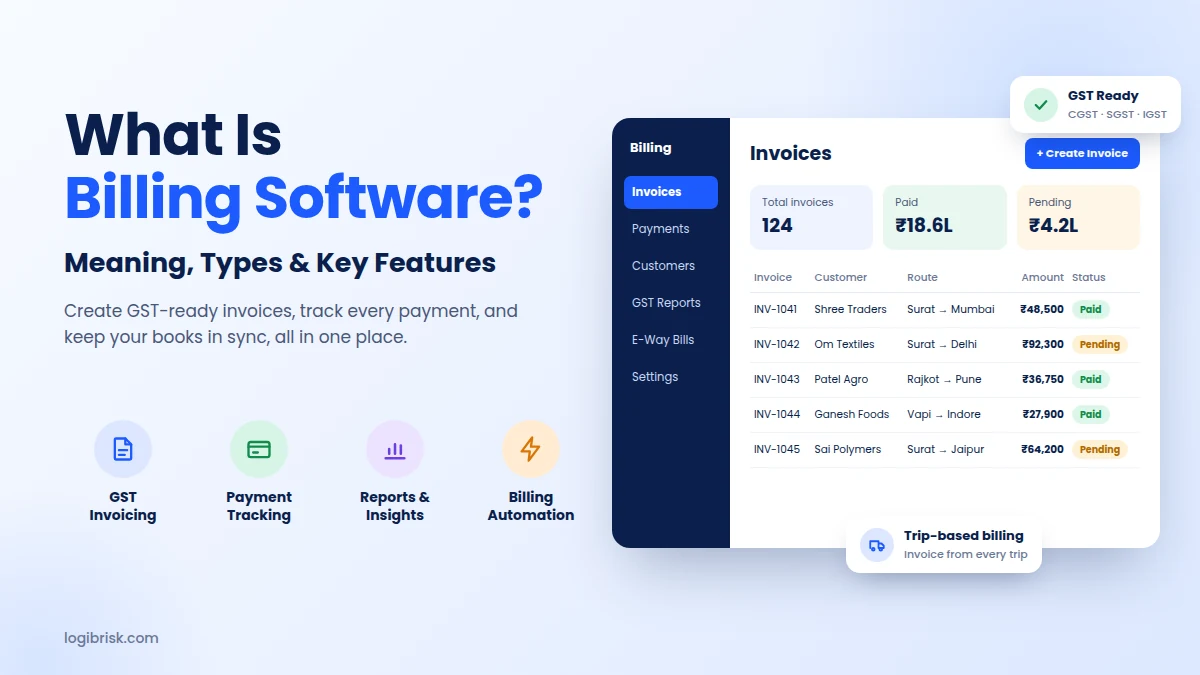
Ever spent the last week of the month chasing bills instead of growing your business? A customer says they never got your invoice. Another one was billed twice. Your accountant needs GST figures by Friday, and the numbers in your register don't match your bank statement.
If this sounds familiar, you are not alone. Most growing businesses in India start with Excel sheets or handwritten bills. It works, until it doesn't. That is exactly the problem billing software is built to solve.
In this guide, you will learn what billing software means, how it works, the main types, the features that actually matter, and how to pick the right one for your business. No jargon, just clear answers.
Billing software is a digital tool that helps businesses create invoices, calculate taxes, track payments, and manage customer bills automatically. You enter the details once, and it generates accurate, GST-ready invoices and reminds you about pending dues.
For example, a transport company that completes 40 trips a month no longer has to calculate freight, add GST, and type each invoice by hand. The trip data flows in, and the invoice is ready in a few clicks.
Also known as billing and invoicing software, it often works as part of a complete Billing and Accounts Management System, so every invoice flows straight into your books.
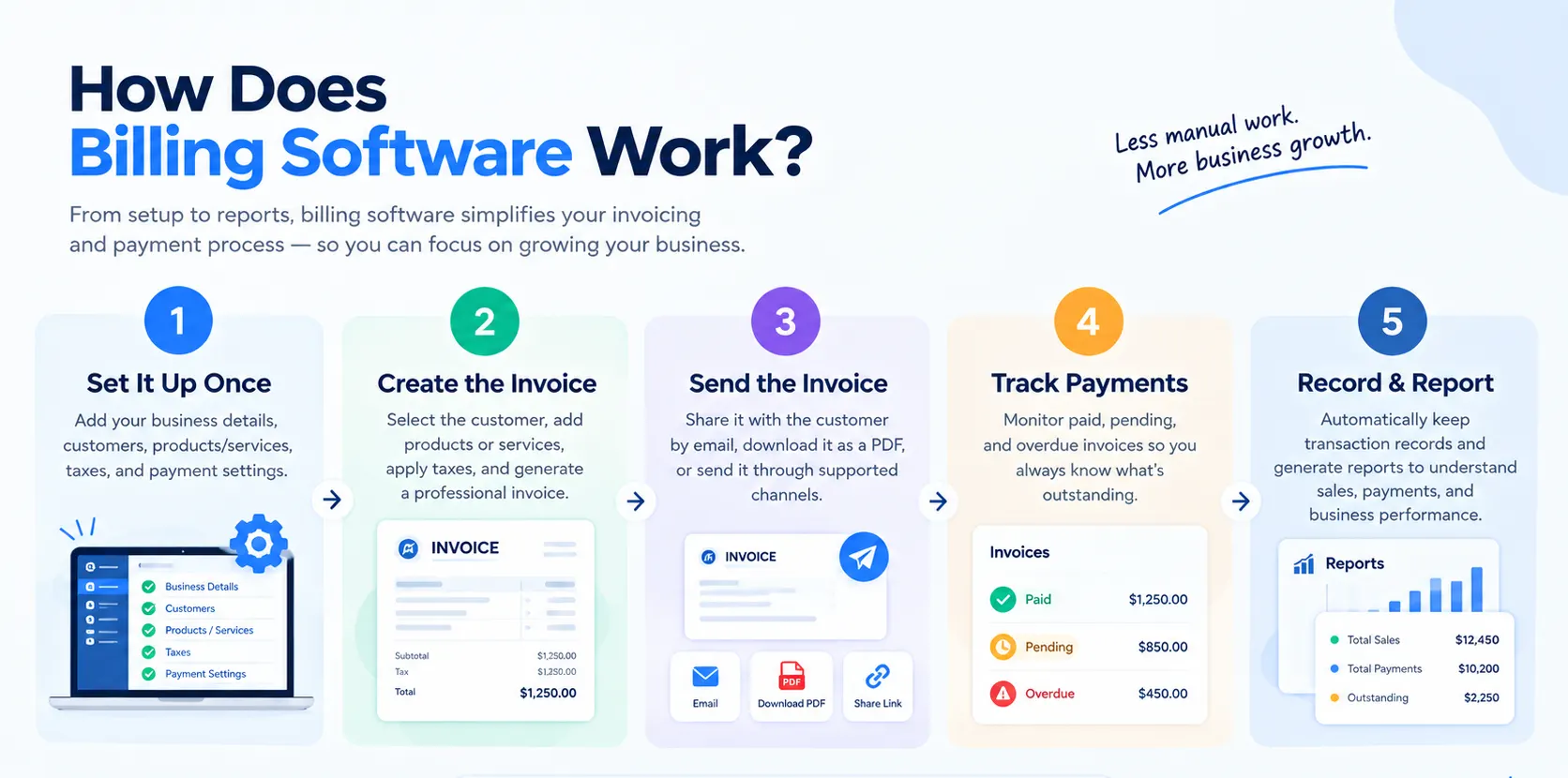
Most billing software follows the same simple flow. Once it is set up, the whole cycle runs with very little manual effort.
In short, it works as a complete bill management system. Every bill is created, sent, tracked, and stored in one place instead of across notebooks, spreadsheets, and inboxes.
Not every business bills the same way, so billing software comes in a few different forms. The right type depends on how you work and where your team operates.
| Type | How it works | Best for |
|---|---|---|
| Desktop (on-premise) | Installed on one computer, data stored locally | Single shops with one billing counter |
| Cloud-based | Runs online, accessible from any device | Teams working across offices, branches, or on the move |
| Industry-specific | Built around one industry's billing rules | Transport, healthcare, retail, restaurants |
| Integrated suite | Part of a larger ERP or management platform | Businesses that want billing, operations, and accounts connected |
For growing businesses, cloud-based and industry-specific tools are usually the better choice. A general billing software handles standard invoices well, but an industry-specific tool understands the details of your work.
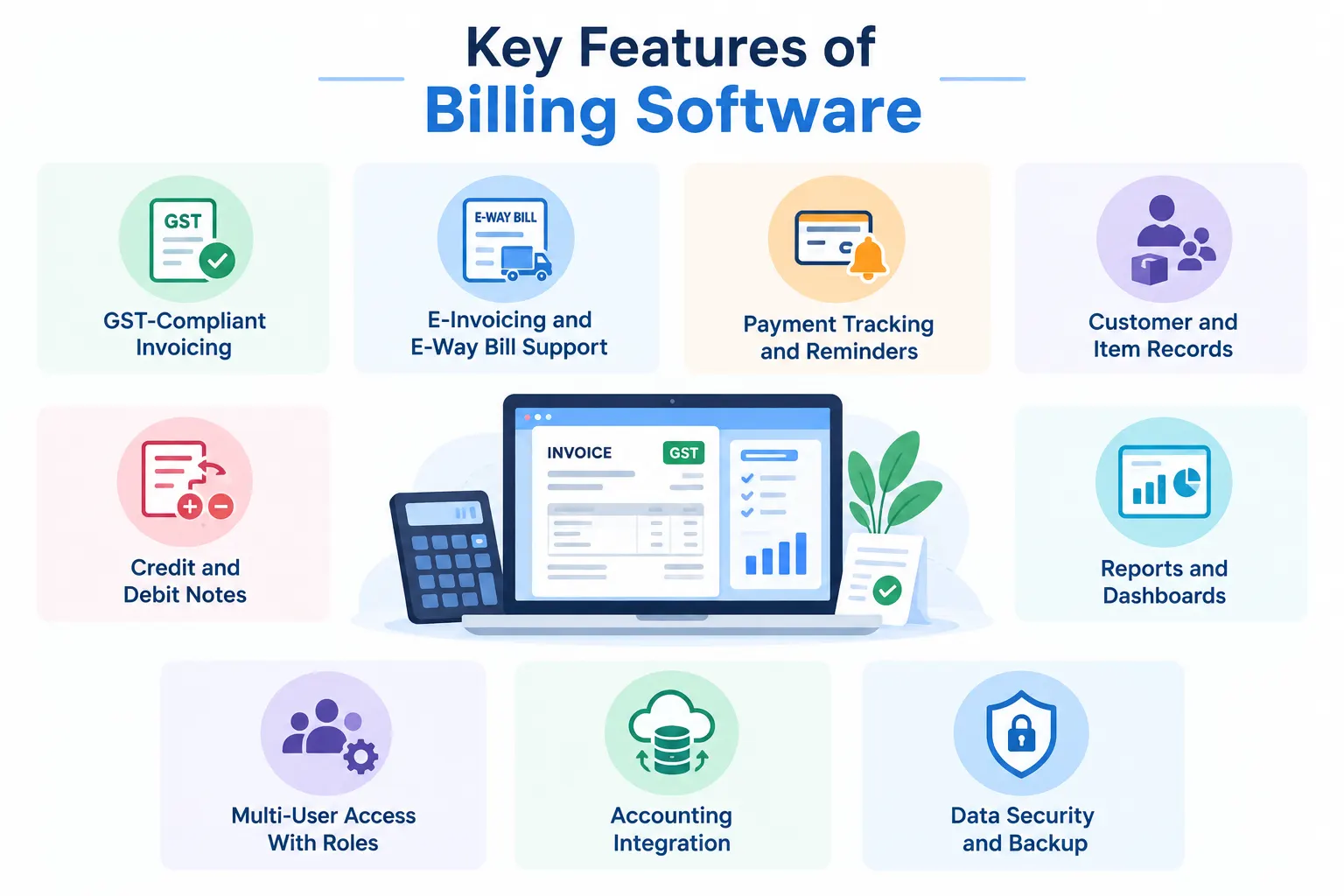
A long feature list looks impressive, but only a few features make a real difference every day. These are the ones to look for:
Invoices include your GSTIN, HSN or SAC codes, and the correct CGST, SGST, or IGST split automatically.
Useful if your turnover requires e-invoicing, or if you move goods that need an e-way bill.
A built-in bill monitoring system shows which invoices are paid, pending, or overdue, and nudges customers before dues pile up.
Save customer details, rates, and contracts once, and reuse them on every bill.
Correct a wrong bill properly instead of deleting it, keeping your records clean for audits.
See sales, tax liability, and outstanding amounts in seconds.
Your billing team, accountant, and manager each see only what they need.
Billing data flows straight into your books, so nothing is entered twice.
Your financial data stays protected and recoverable.
If you are comparing tools, check the first three features closely. They save the most time and prevent the costliest mistakes.
People often use these terms interchangeably, but they do different jobs. Billing software manages money coming in from customers. Accounting management software manages the complete financial picture of the business.
| Points | Billing software | Accounting software |
|---|---|---|
| Main purpose | Create invoices and collect payments from customers | Record, organise, and report all financial transactions |
| Scope | Covers the sales side: invoices, receipts, and dues | Covers the whole business: income, expenses, assets, and liabilities |
| Key tasks | Invoicing, GST calculation, payment tracking, reminders | Ledgers, bank reconciliation, payroll, tax returns |
| Main users | Billing, sales, and operations teams | Accountants and finance teams |
| Main output | Invoices, receipts, and payment status | Profit and loss, balance sheet, and financial statements |
| How often used | Daily, every time a sale or trip is completed | Daily entries, plus monthly and yearly closing |
| GST role | Creates GST-compliant invoices and e-way bill details | Uses invoice data to prepare and file GST returns |
| Best for | Businesses that need fast, accurate billing | Businesses that need complete financial control |
Most businesses need both, and they work best when connected. A combined billing and accounting solution means an invoice created by your billing team automatically appears in your books. This removes double entry and the errors that come with it.
The real benefit is not just faster invoices. It is peace of mind that your numbers are right.
Automatic tax and total calculations remove the typos and wrong GST rates that creep into manual bills.
Invoices go out on time and reminders go out automatically, so cash comes in sooner.
Your sales and tax data is already organised when it is time to file returns. See how GST billing software helps transport businesses save time.
Work that took hours at month-end now takes minutes, freeing your team for customers.
You know exactly who owes you what, at any moment, without digging through files.
Whether you send 50 bills a month or 5,000, the process stays the same.
If you run a transport or logistics business, general billing tools often fall short. Your bills depend on trips, routes, weights, detention charges, and fuel surcharges that a standard invoice template simply does not understand.
This is where transport billing software helps. It can:
The biggest advantage comes when billing is connected to your operations. When billing sits inside your transport management platform, every completed trip can turn into an accurate invoice, using the same trip, vehicle, and route data your team already records. For goods that move with GST paperwork, a GST and e-way bill enabled logistics system helps you create the right documents alongside every invoice.
This matters even more for full truckload operators and freight brokers, where every trip has its own rate, route, and set of extra charges. When billing is part of the same system, nothing gets missed between the trip and the invoice.
Still comparing platforms? Our guide to the best transportation management software in India can help you shortlist the right one.
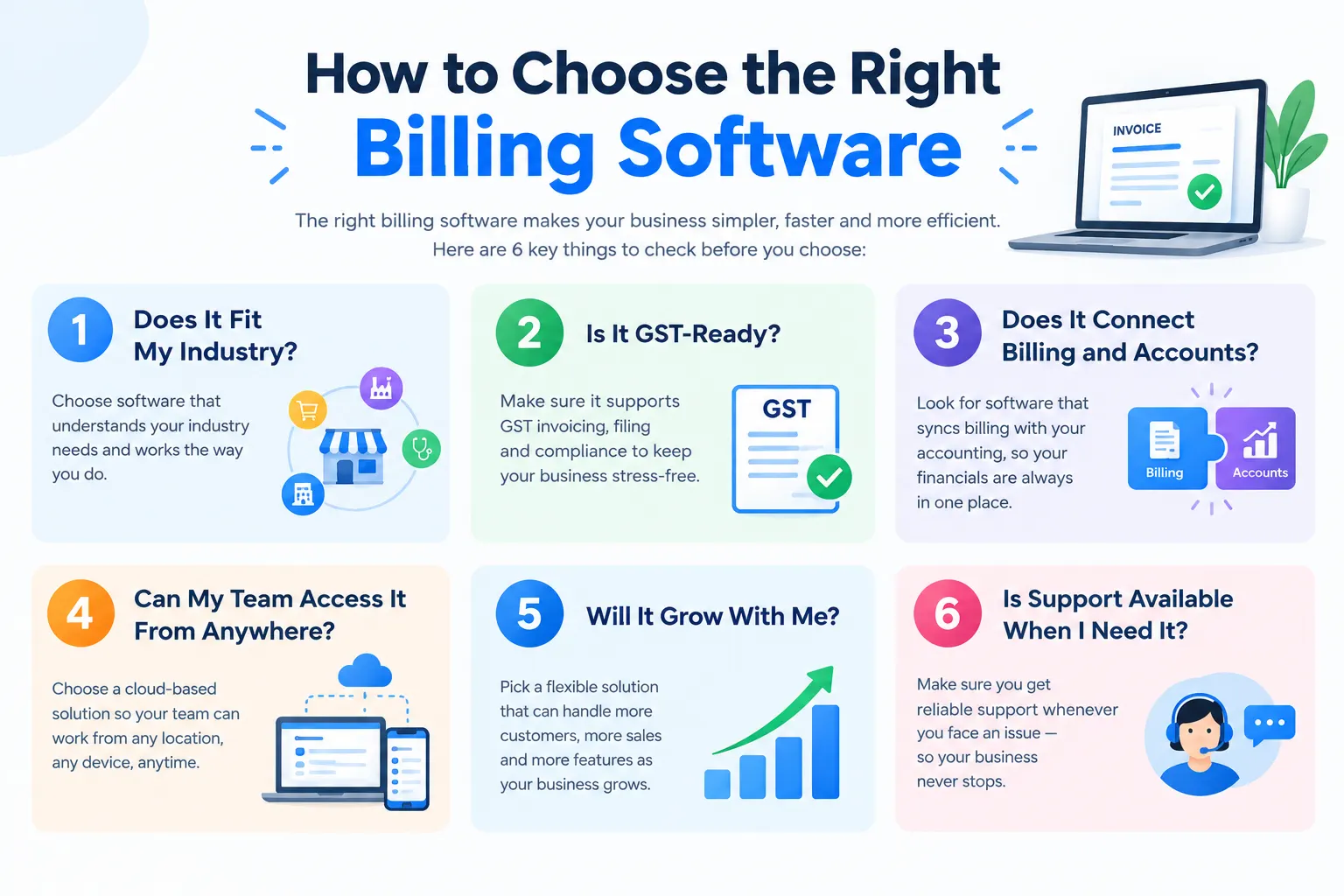
Before you sign up for any tool, ask these six questions. They will save you from switching again a year later.
A retail tool may not understand freight billing, and a transport tool may be too much for a small shop.
Check for GST invoices, e-invoicing, and e-way bill support if your business needs them.
A complete Billing and Accounts Management System keeps invoices, payments, and books in sync without double entry.
Cloud access matters if you have branches, field staff, or remote accountants.
Look for multi-user access, custom reports, and room for more customers and transactions.
Quick, local support is worth a lot when invoices are stuck at month-end.
A simple tip: ask for a demo using your own real invoices. You will know within 30 minutes whether the software fits the way your business actually works.
If you run a transport or logistics business, LogiBrisk brings billing and operations together, so you don't have to juggle separate tools. Your invoices come from the same trips, vehicles, and documents your team already manages.
Freight invoices are created from recorded trip data, so nothing is typed twice.
Invoices, payments, and books stay in sync, with no double entry.
Tax invoices and e-way bill documents are handled in the same workflow.
Transport management, fleet, FTL, and broker tools all work alongside billing.
Designed around GST rules and the way Indian transport businesses bill their clients.
Explore all LogiBrisk platform features to see how billing fits into your daily operations.
Billing should not be the most stressful part of your month. The right billing software turns a messy, manual process into a simple routine: bills go out on time, taxes are correct, and you always know who owes you what.
Start by listing how your business bills today, where mistakes happen, and how much time your team spends on it. That list will show you exactly which features matter most.
If you run a transport or logistics business and want billing that connects directly to your trips and fleet, talk to our team. We will show you how it works with your own data.
Billing software is a tool that creates invoices, calculates taxes, and tracks customer payments automatically, so you don't have to prepare bills by hand.
Popular options include LogiBrisk, TallyPrime, Zoho Books, Vyapar, and Marg ERP for general businesses. Transport and logistics companies usually get better results from billing that is built into their transport management platform.
An invoice is the document you send to a customer. Billing is the complete process: creating the invoice, sending it, tracking payment, and recording it.
Yes. Even a business sending 20 invoices a month saves time, avoids GST errors, and gets paid faster with the right billing software.