When a customer’s payment gets stuck, the reason is often simple. The Proof of Delivery (POD) has not come back from the driver yet, so you cannot send the invoice and your money stays with the customer.
When bookings are written in registers and every update needs a phone call, this happens again and again across every branch.
Logistics management software is meant to fix this. It keeps your bookings, truck status, POD, and billing together, so your team is not chasing papers and drivers all day.
In this guide, you will learn what the software does, what to look for, and how to test it with your own trips before you pay. You will also see the mistakes that make people stop using it after a month.
Key Takeaways
- Logistics management software keeps your bookings, truck tracking, POD, and billing together.
- A digital POD lets you bill sooner and collect payment faster.
- Customer tracking links can reduce repeated status calls.
- Always test a vendor with your own trips, not sample data.
- Start with one branch or a few routes before you commit.
What Is Logistics Management Software in Simple Words?
Logistics management software is a digital system that manages your transport business from taking a booking to collecting payment. It replaces paper trip sheets and registers with one system that all your branches can use at the same time.
How Logistics Management Software Changes Your Daily Operations
Here is how a typical day changes when your branches move from paper and phone calls to a digital system.
| Daily Task |
Without Software |
With Software |
| Creating an LR |
Written by hand at each branch |
Created on screen in seconds |
| Checking truck location |
Repeated calls to the driver |
Updated on the app and map |
| Receiving POD |
Can take up to two weeks by courier |
Driver uploads a photo after unloading |
| Customer asks “Where is my goods?” |
Staff search and call to find out |
Staff or customer check the status online |
The biggest difference is in the POD row. Your invoice usually waits for the POD, so a POD that arrives two weeks late also delays your payment by two weeks. Getting the POD on the day of delivery lets you bill sooner and collect sooner.
For a wider system that also covers accounts and other departments, see our guide to Logistics ERP Software.
7 Best Features to Look for in Logistics Management Software
Indian transport has its own needs, such as e-way bills, GST billing, and multi-branch bookings. These seven features matter most.
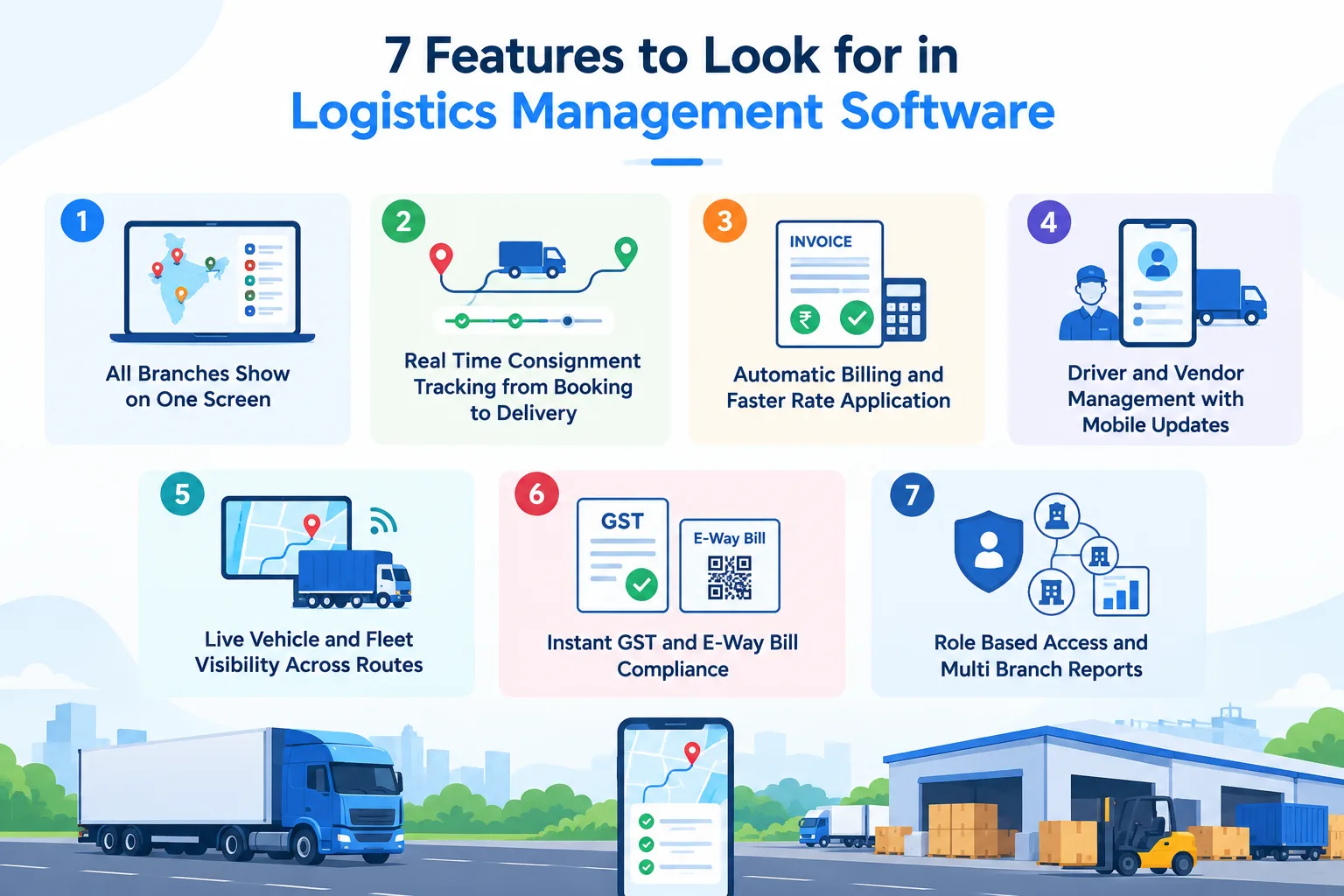
1. All Branches Show on One Screen
- Central Control. Displays live trip counts, open bookings, and vehicle placements across all branch locations on a single dashboard without needing phone calls.
- Instant Server Updates. Branch staff enter consignments locally, and data updates immediately across the main office records so management stays informed.
- When It Helps Most. Essential when opening a second or third branch where tracking daily paper bookings becomes difficult to manage.
2. Real Time Consignment Tracking from Booking to Delivery
- Live Milestone Alerts. Tracks every consignment step from pickup at the warehouse to final drop off at the customer site.
- Customer Notification Links. Sends automated SMS or WhatsApp tracking links to clients so they check status online instead of calling your team.
- Reduced Tracking Calls. Cuts daily status phone calls drastically while giving customers complete peace of mind about their freight.
3. Automatic Billing and Faster Rate Application
- Preset Rate Matrix. Applies customer specific contract rates, party freight charges, and demurrage calculations automatically as soon as an LR is logged.
- One-Click Invoicing. Generates accurate freight bills right after delivery approval, helping you send invoices faster and collect cash sooner.
- Fewer Billing Mistakes. Prevents human pricing errors on complex route contracts and saves hours of manual rate verification.
4. Driver and Vendor Management with Mobile Updates
- Digital POD Capture. Drivers snap a quick photo of the signed delivery paper on their phone, sending instant proof to the billing desk.
- Vendor Payment Tracking. Records balance payments, advances, and hired vehicle charges clearly so market lorry accounts stay accurate.
- Faster Cash Cycles. Eliminates the two week wait for physical courier papers so you can bill clients the same day delivery happens.
5. Live Vehicle and Fleet Visibility Across Routes
- GPS Map View. Shows exact truck positions, highway movement speeds, and unexpected route stops on a live map interface.
- Route Delay Warnings. Alerts your dispatch team if a truck spends too much time at a toll gate or loading dock.
- Lower Running Costs. Helps lower total trip expenses and cuts empty running kilometers between pickup points across top corridors. For a look at top providers in the market, explore our review of Logistics Software Companies in India.
6. Instant GST and E-Way Bill Compliance
- Direct Portal Sync. Generates e-way bills directly inside your booking workflow without copying party GST numbers or invoice values manually.
- Automated Expiry Alerts. Highlights e-way bills nearing expiration so your dispatch team can extend validity before trucks reach check posts.
- Zero Highway Fines. Protects your drivers from costly RTO detentions and tax penalties caused by expired paperwork. To see why tax integration matters, read how Indian Transporters Need GST-Integrated Logistics Software to stay compliant.
7. Role Based Access and Multi Branch Reports
- Secure Staff Permissions. Restricts sensitive financial data so branch clerks only see their local bookings while management sees company wide totals.
- Automated Profit Reports. Generates daily route profitability, branch revenue totals, and vehicle margin reports with a single click.
- Better Decision Making. Gives transport owners accurate facts to negotiate better freight rates with large corporate shippers. Discover more about route optimization and dispatch in our guide to TMS Software.
How to Choose the Right Logistics Software: 6 Steps
Most buyers compare feature lists and pick the vendor with the longest one. A better method is to decide what you want to fix, test vendors on your own trips, and start small before you commit.
Step 1: Write Down Your Top 3 Problems, With Numbers
Before you see any demo, measure where you stand today. This is how you will know later whether the software worked.
| Problem |
Your Number Today |
Your Target |
| Days to receive POD |
___ days |
___ days |
| Days from delivery to invoice |
___ days |
___ days |
| Status calls per day |
___ calls |
___ calls |
| Billing mistakes per month |
___ |
___ |
| E-way bills missed or expired |
___ per month |
0 |
If you don’t have exact figures, ask your accountant and dispatcher for rough numbers. A rough number is enough.
Step 2: Remove Vendors That Miss the Basics
Don’t compare features yet. Check only these must-haves, and drop any vendor that fails one.
- Creates the Lorry Receipt (LR) and the freight bill in the same system
- Creates e-way bills from the booking screen and warns you before expiry
- Lets drivers upload a POD photo, even with no network
- Shows all branches on one screen
- Lets you export all your data to Excel at any time
- Offers phone support during Indian business hours
Aim for a shortlist of 3 vendors.
Step 3: Run the Demo With Your Own Trips
Do not accept a demo with sample data. Bring 5 real trips and ask the vendor to do the following live:
- Create an LR for a part-load trip with two consignees.
- Create an e-way bill from that LR.
- Apply your real customer rate and generate the bill.
- Upload a POD photo from an ordinary phone with the network off, then switch the network on.
- Show the profit for one route and one branch.
- Export your customer balance to Excel.
Any step the vendor cannot do live, or says “we will check later,” counts against them.
Step 4: Let Your Team Try It for One Day
The person who uses the software daily matters more than the person who signs the cheque.
- Branch clerk: Can they create an LR in under 3 minutes after a short introduction?
- Accountant: Can they find a customer’s pending balance without help?
- Driver: Can they upload a POD photo using a budget phone on a weak network?
If your staff finds it confusing during a trial, it will be worse on a busy day.
Step 5: Find the Real Cost
The listed price is rarely the full price. Ask each vendor for a written quote that answers these questions:
| Ask About |
Why It Matters |
| Is the price per user, branch, truck, or booking? |
The cost can rise sharply as you grow. |
| Are SMS, WhatsApp, and e-way bill charges included? |
These are often billed separately. |
| What are the setup, data import, and training fees? |
One-time costs add up. |
| Are tax and rule updates free? |
Some vendors charge extra for them. |
| What is the renewal price after year 1? |
Yearly increases are common. |
| What happens to my data if I leave? |
You need the right to export it. |
Compare the total cost for 12 months, not just the monthly price.
Step 6: Run a Pilot Before You Sign a Long Contract
Run the software on one branch or a few routes for 2 to 4 weeks. Keep your old method running in parallel for the first week. At the end, return to your Step 1 table and compare.
- Did POD time drop?
- Did invoices go out sooner?
- Did status calls reduce?
- Did your staff keep using it by choice?
6 Mistakes to Avoid After Buying Logistics Software
Good software can still fail if you start the wrong way. Here are the six mistakes to avoid, with the most costly one first.
1. Don’t keep writing paper LRs “just in case”
If your clerk writes the LR by hand and then types it into the software, you are doing the work twice. Soon your team will feel the software is extra effort. Run both together for one week only. After that, pick a date and stop paper LRs for all new trips.
2. Don’t leave it with “everyone”
When everyone is responsible, no one is. Choose one person, such as your accountant or branch manager, to look after the setup for the first 30 days. Ask them every week, “What is not working?”
3. Don’t enter bookings at the end of the day
If data is entered late, your head office sees old numbers and goes back to phone calls. Follow one simple rule: create the LR when the goods are booked, and upload the POD on the day of delivery.
4. Don’t skip driver training
If your drivers keep sending POD photos on WhatsApp, your billing team will still chase papers. Sit with each driver for 15 minutes. Teach just two things: confirm loading and upload POD.
5. Don’t load your old, messy data
Old customer lists often have duplicate names, wrong rates, and balances nobody has checked. Add only your active customers and current rates. Check old balances with your accountant before you start.
6. Don’t forget to measure the results
After three months, you will not remember how long POD took before. Write down today’s POD days, invoice days, and daily status calls. Check them again every month to see what has improved.
Related reading: Benefits of ERP Software for Logistics and Transportation
How LogiBrisk Helps You Manage Every Branch From One Screen
As your business grows to more trucks and more branches, phone calls and spreadsheets become hard to manage. Head office waits for branch reports, delivery receipts arrive late, and it is difficult to know which routes are actually profitable.
Logistics Management Software brings your branches, bookings, and billing onto one screen. Here is how it helps in your daily work.
Full Visibility Across Branches
Open the dashboard each morning to see today’s bookings, running trips, and pending bills for every branch, without calling each branch manager.
Tracking From Booking to Delivery
Every consignment is tracked until it is delivered. Your team and your customers can check the status themselves, which reduces repeated “where is my goods?” calls.
Clear View of Route Profitability
Branch-wise and route-wise reports show which routes earn well and which ones need attention, so your decisions are based on facts.
Customers and Vendors in One Place
Customer rates, pending balances, and hired-truck payments are easy to find, so you no longer need to search through registers.
Support for Full and Part Loads
You can manage full truck load (FTL) and part truck load (PTL) bookings, along with billing and fleet records, in a single system.
Access Based on Role
Branch staff see only their own branch’s data. Owners and senior managers see the full company picture.
See It on Your Own Trips
The best way to judge whether it suits your business is to try it with your own data. Schedule a demo, and we will set it up using your real trips and customers instead of sample data.
Final Thoughts
Upgrading to modern logistics management software gives you complete control over your daily branch bookings, vehicle movement, and customer billing. By selecting a system with clear dashboards, direct tax compliance, and simple driver apps, you eliminate manual errors and speed up your cash flow.
Take time to test key capabilities with your team today so you can build a faster, more profitable transport enterprise for 2026.
Frequently Asked Questions
Which size fleet needs logistics management software?
It helps most when you run five or more trucks, or more than one branch. At that point, paper registers and phone calls start causing delays and billing errors. Even smaller fleets can benefit if POD and billing delays are a problem.
How long does it take to train branch staff on logistics software features?
Most simple logistics platforms are designed for easy learning. Branch computer operators usually learn how to issue digital LRs, assign vehicles, and check tracking status in less than two days of basic practice.
Does the software help with GST filing and e-way bill extensions?
Yes, dedicated logistics platforms connect directly with government portals. You can generate e-way bills with one click during booking and receive automated warnings before documents expire on long transit routes.
Can a small transporter afford a logistics management system?
Modern transport software offers flexible monthly or annual subscriptions based on your fleet size. Small transporters can start with basic booking and billing features without paying huge upfront software costs.