




It is 11 at night. You have three tabs open: Amazon, your website and a stock sheet. Sound familiar?
If yes, a spreadsheet and WhatsApp are no longer enough. An ecommerce management system keeps your orders, stock, shipping, returns and payments in one place.
This guide explains the 8 signs it is time to move, how to fix each one and how to choose the right software.
Key Takeaways
- An ecommerce management system handles everything after the order.
- Eight signs, such as overselling, COD mismatches and unknown profit, show when it is time to switch.
- Fix the sign that costs you the most first.
- Shortlist 2 or 3 tools and test them with your own orders.
What Is an Ecommerce Management System?
An ecommerce management system is software that handles everything after a customer places an order. That means orders, stock, shipping, returns and payments.
It is different from a store platform like Shopify. A store platform shows your products and takes payments. An ecommerce management platform runs the work behind the scenes.
You may also hear it called ecommerce logistics software or ecommerce shipping management software, depending on which part of the work it focuses on.
New to this? Start with our ecommerce management software guide.
8 Signs Your Business Needs Ecommerce Management Software
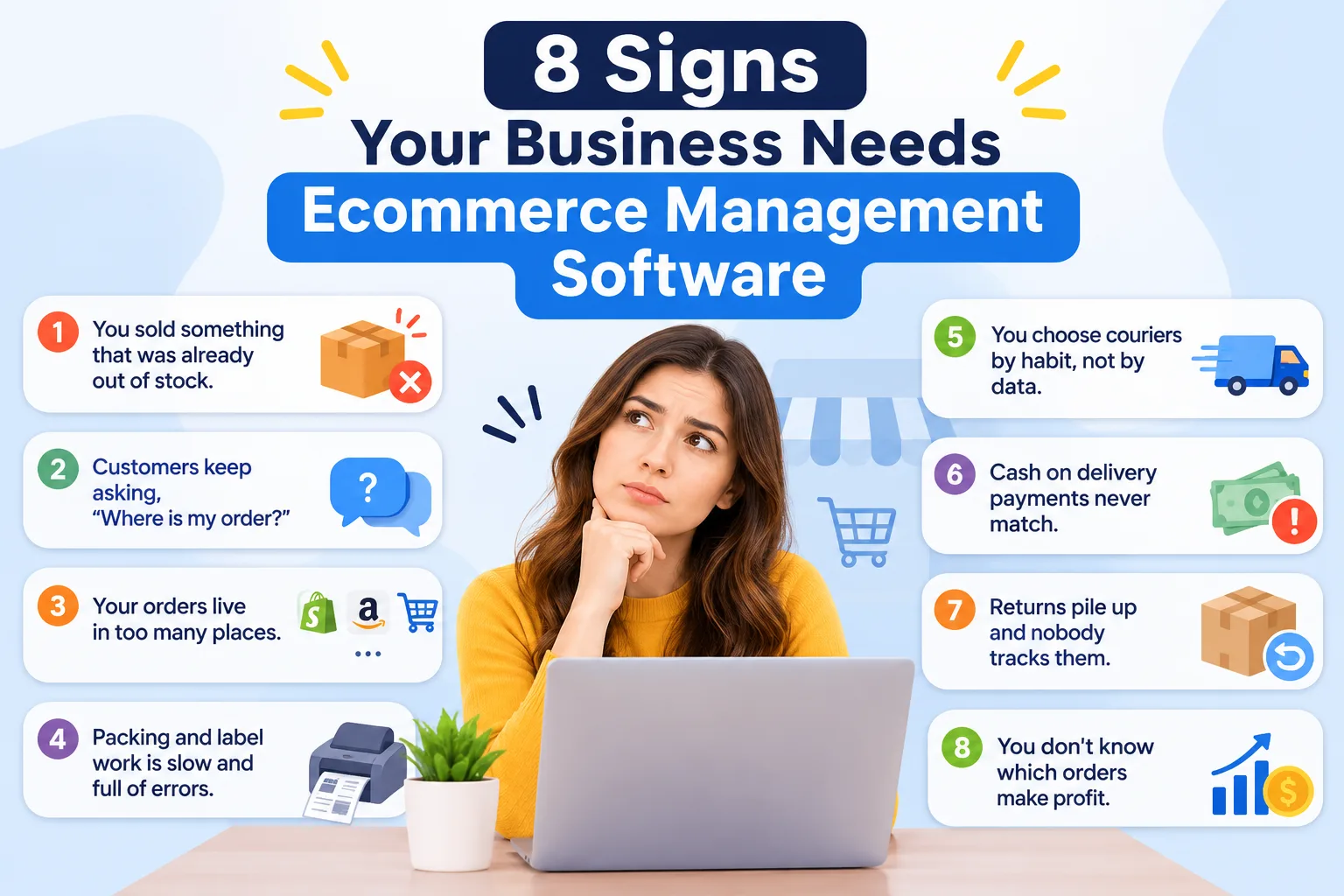
Sign 1: You Sold Something That Was Already Out of Stock
What it looks like: A customer buys the last piece on Flipkart. At the same time, someone buys it on your website. Now you have two orders and one item. You cancel one and send an apology.
Why it happens: Each sales channel keeps its own stock count. You update them by hand, so they are always a little behind.
How it helps: It keeps one stock number for every channel. When an item sells anywhere, the count drops everywhere. Overselling is the first of the common ecommerce order management mistakes.
Sign 2: Customers Keep Asking, "Where Is My Order?"
What it looks like: Your phone fills with "Where is my order?" messages. Your team spends the morning replying instead of packing.
Why it happens: After payment, the customer hears nothing. So they ask.
How it helps: An ecommerce delivery management system follows each parcel. It sends the customer tracking updates by SMS or WhatsApp. The customer stays informed, and your inbox stays quiet.
Sign 3: Your Orders Live in Too Many Places
What it looks like: Every morning you open Amazon, your website and a WhatsApp chat. You copy the orders into one sheet. One missed copy means one missed order.
Why it happens: Each channel has its own dashboard, and nothing joins them.
How it helps: A good ecommerce management software pulls orders from all channels onto one screen. Your team works from one list. When you add a new channel, the daily routine stays the same.
Sign 4: Packing and Label Work Is Slow and Full of Errors
What it looks like: The picker reads a handwritten list and grabs the wrong item. A label has a wrong pin code. The parcel fails delivery and comes back.
Why it happens: Typing and copying by hand creates small mistakes. In ecommerce logistics management, one small mistake in a label can mean a failed delivery.
How it helps: It prints a digital packing list that shows exactly what to pick, supports barcode checks while packing, and creates labels automatically with address checks.
Sign 5: You Choose Couriers by Habit, Not by Data
What it looks like: You ship with the same courier because you always have. You don't know if another courier is faster or cheaper for a certain city.
Why it happens: Each courier has its own portal and its own reports. Nobody puts them side by side.
How it helps: Ecommerce shipping management software connects your couriers in one place. It helps you choose a courier for each order, print labels in bulk and track every parcel. Good ecommerce logistics software also shows how each courier performs. So you decide with facts.
Sign 6: Cash on Delivery Payments Never Match
What it looks like: At month end, the courier says they paid you one amount. Your sheet says another. You spend two days finding which orders are missing.
Why it happens: Cash on delivery (COD) money reaches you through couriers, often in bulk payments. It is hard to match with single orders by hand.
How it helps: It matches payments against each order and shows which COD amounts are still pending. You can chase the right courier for the right amount.
Sign 7: Returns Pile Up and Nobody Tracks Them
What it looks like: Returned parcels sit in a corner of the warehouse. No one knows which are good to resell, which need a refund and which are lost on the way.
Why it happens: Returns follow a different path from orders, and often nobody owns them.
How it helps: It records each return against its original order and shows its status. Items that are in good shape can go back into stock, so you can sell them again.
Sign 8: You Don't Know Which Orders Make Profit
What it looks like: Sales look good, but your bank balance does not. After courier fees, returns and discounts, you are not sure what you earn on each order.
Why it happens: The costs sit in different places: couriers, payment gateways, marketplace fees and your own sheets.
How it helps: It gives you reports on orders, courier performance, returns and profit per order. You can see which products and channels pay, and which ones cost you money.
How to Choose an Ecommerce Management Platform
Start with our guide to the best ecommerce management software in India. Then check that the software can do these things:
- Fixes your biggest sign. Look at the 8 signs above. The tool must solve the one that costs you the most.
- Connects to your sales channels. It should pull orders from Amazon, Flipkart, your website and anywhere else you sell.
- Works with your couriers. It should support the couriers you use and print their labels.
- Handles cash on delivery. It should match every COD payment to its order.
- Shows one live stock count. When an item sells on one channel, the count drops on all of them.
- Shows a clear price. Ask for a quote based on your own monthly orders.
- Passes a test with your own orders. Ask for a demo and run your real orders through it. Our 10 checks on how to choose ecommerce management software give you questions to ask.
Common Mistakes to Avoid When Choosing Ecommerce Software
These mistakes waste money and time. Avoid them and your choice gets much easier.
- Choosing by price alone. A cheap tool costs more in the end if it misses a feature you need. Compare what each tool does, not only what it costs.
- Ignoring hidden costs. Ask what you pay for setup, extra users, extra orders and support. A low monthly price can grow fast.
- Paying for features you will not use. A long feature list adds cost and confusion. Pick the tool that fixes your biggest problem first.
- Forgetting your team. If your staff find it hard to use, they will go back to spreadsheets. Let them try the demo too.
- Not asking about support. Ask who helps you when something breaks and how fast they reply.
Conclusion
You don't need to be a big brand to need an ecommerce management system. If you spend your day copying orders and matching payments, your tools are slowing you down.
Ready to stop chasing orders across tabs? See how LogiBrisk helps you manage orders, shipping and daily operations from one platform.
Frequently Asked Questions
What is an ecommerce management system?
It is software that manages everything after a customer places an order: orders, stock, shipping, returns and payments. It is also called an ecommerce management platform.
How is an ecommerce management system different from Shopify?
A store platform shows your products and takes payments. An ecommerce management system handles the work after the order, such as stock, courier selection, tracking and returns.
What is ecommerce shipping management software?
It is the part of the system that deals with shipping. It connects your couriers, prints labels, tracks parcels and shows courier performance.
When should a small seller switch to an ecommerce management system?
Switch when manual work starts to cost you orders or customers. Overselling, repeated "Where is my order?" messages and COD payments that don't match are clear signals.
Can an ecommerce management system handle cash on delivery?
Many can. Ask the vendor to show how it matches COD payments to each order, using your own data.
Does an ecommerce delivery management system send updates to customers?
A good one does. It tracks each parcel and sends the customer delivery updates, so you get fewer status calls.
How much does an ecommerce management system cost?
It depends on your monthly order volume, the number of sales channels and the features you need. Many vendors give a price after a demo, so ask for a quote based on your own order numbers.